Written by Tibor Steve Simon / Posted at 10/8/26
From real-world driving to searchable test data with aiMotive’s Rooftop Box and aiData toolchain – ADAS/ADS Regulation Series, Part 2
In our previous article, we explored a common direction across UN and EU ADAS/ADS frameworks and Euro NCAP assessments: validation increasingly relies on measurable, traceable evidence of how a system behaves in relevant driving situations.
That raises a practical question: how do we capture an independent real-world reference of what actually happened around the vehicle and use it efficiently to evaluate system behavior?
The first step is not a metric or a report. It is an independent, well-synchronized view of what happened around the vehicle, captured with enough context to be found, reviewed, and reused later in the validation workflow.
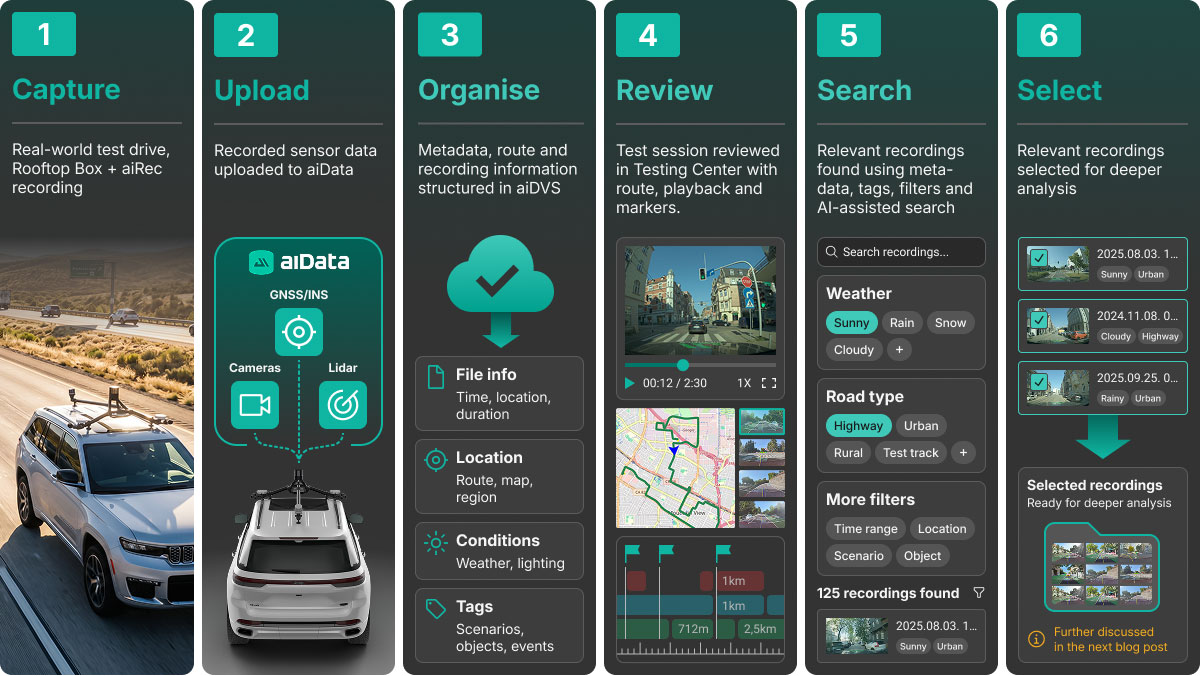
Why does an independent observer matter?
Vehicle-internal data is essential for development and validation, but it cannot by itself provide an independent reference. The vehicle’s perception outputs describe the environment as interpreted by the system under assessment, so its limitations and assumptions can also influence the information used to explain its behavior.
An independent measurement layer provides a separate reference for the surrounding environment and ego motion. Where available, vehicle-internal signals can be aligned with the same timeline.
To evaluate system behavior objectively, the overall measurement setup should help answer three key questions:
What was present in the environment?
How did the vehicle respond?
What did the system communicate to the driver?
At the core of this setup is the aiMotive Rooftop Box.
Capturing an independent view of the test
The Rooftop Box is a compact, roof-mounted measurement platform combining wide-field-of-view cameras, LiDAR and high-precision GNSS/INS positioning. The camera and LiDAR setup records the surrounding traffic environment and road scene, while the GNSS/INS system provides precise ego position, orientation and motion. Together, these sensors create an independent, time-synchronized reference of both the vehicle’s surroundings and its own motion, separately from the vehicle’s production perception system. Its design supports straightforward installation and calibration, with the sensor assembly mounted outside the cabin.
At the customer’s request, the recording setup can be extended with CAN data, a dashboard camera and available Driver Monitoring System outputs.
CAN recording requires customer-provided access to the vehicle network and relevant signals, which may include speed, steering, braking, system states and driver interventions. A dashboard camera can capture information presented to the driver, while available Driver Monitoring System outputs can provide additional context about driver state or behavior.
These additional data sources can be synchronized with the Rooftop Box recordings, adding further context on how the vehicle responded, what information was presented to the driver and, where DMS data is available, the driver’s state or behavior.
Figure 1. Example Rooftop Box configuration showing the sensor setup and coverage around the vehicle.
Recording and Monitoring During the Test
aiMotive’s recording software, aiRec, captures synchronized raw sensor streams in a consistent format, creating a reliable foundation for subsequent processing, annotation, and validation. At the same time, sensor health monitoring and real-time diagnostics help engineers check the recording status while the vehicle is collecting data.
Test engineers can add time-stamped markers and comments to flag noteworthy moments during a recording. These notes provide valuable context for later review, helping teams quickly identify and revisit events of interest without affecting the automated processing or evaluation workflow.
Synchronization and sensor calibration also support the later reuse of suitable recordings in aiSim workflows, including Neural Rendering. We will return to this later in the series.
Figure 2.: In-vehicle recording interface showing sensor status and the test engineer adding a time-stamped marker/comment
From recording to searchable data
Collecting the data is only the beginning. Raw sensor recordings alone are difficult to search, compare, or use directly as evidence for validation. After upload, recordings enter the aiData ingestion workflow, where they are registered and organized before detailed scene annotation.
The underlying aiData Versioning System (aiDVS) stores metadata in a PostgreSQL database and links it to sensor files held in file storage. Test sessions, vehicle information, routes, and subsequent processing results remain connected within the same data environment. During ingestion, the recordings are also enriched with contextual information and prepared for later search and filtering.
This supports a practical objective: finding the recordings relevant to a specific test or evaluation question.
Reviewing the recorded test
The Testing Center brings together recorded test sessions, vehicle metadata, routes, synchronized camera playback, and time-stamped comments captured during testing. It provides a central view of the recorded test, allowing engineers to review the route, inspect the synchronized recordings, and return to moments that were flagged during the drive.
Figure 2.: In-vehicle recording interface showing sensor status and the test engineer adding a time-stamped marker/comment
Making recordings searchable before annotation
For larger recording campaigns, manual review alone is not practical. During ingestion, recordings receive contextual auto-tags derived from available map and weather data through integrated external services. Combined with metadata such as time and location, these tags make it easier for engineers to find relevant recordings by filtering for road type, time of day, automatic or manual flags, or environmental conditions.
For example, a team investigating nighttime performance can narrow down the dataset by time and road type before reviewing the relevant footage. These tags provide selection context rather than a sensor-derived reconstruction of the scene and they do not require detailed object-level annotation.
aiData also generates image embeddings that support natural-language and visual-similarity searches in the Annotation Center. When predefined tags are insufficient, this search capability helps retrieve candidate recordings before detailed annotation is performed.
Together, these capabilities help engineers narrow a complete recording campaign to a smaller set of candidate recordings for manual review and further processing.
Access is not limited to the graphical interface. aiData also provides APIs for integration into customer engineering workflows, while the underlying metadata can be queried directly through SQL for more specialized analysis.
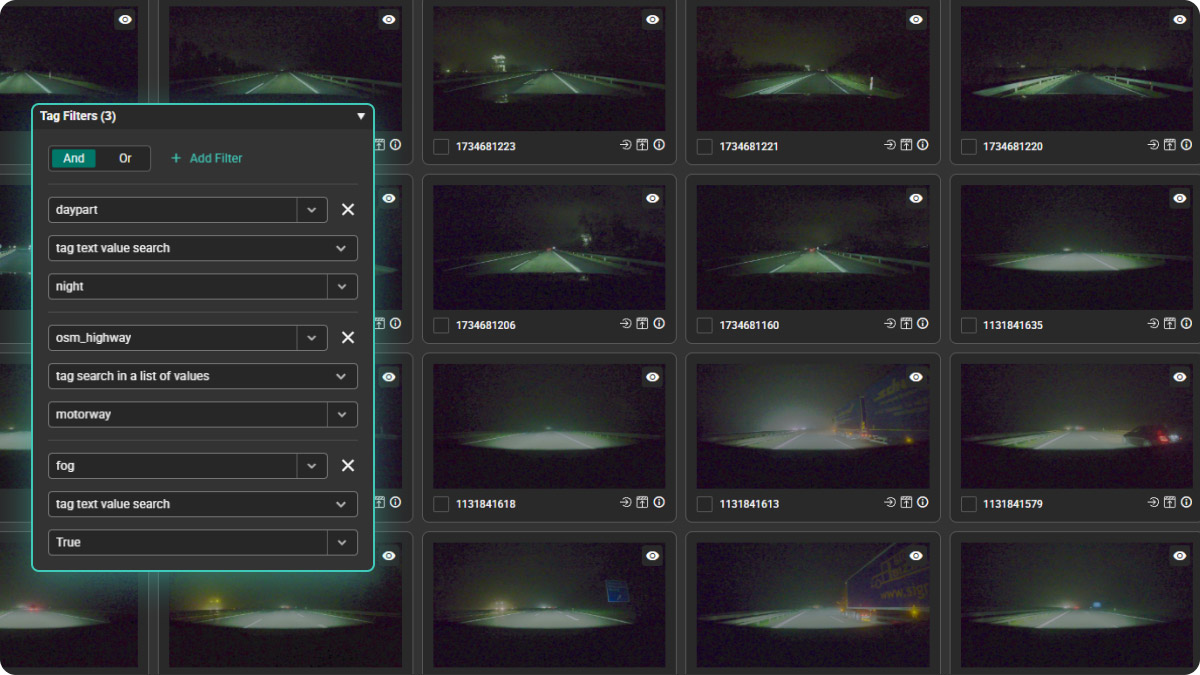
From selected recordings to deeper analysis
Together, the Rooftop Box and aiData provide a foundation for targeted ADAS/ADS evaluation: capturing tests independently, preserving their context, and helping engineers find the data relevant to their validation question.
However, finding the right recording is not the same as understanding the driving situation it contains.
What’s next?
In Part 3 of the series, we’ll explore how auto-annotation turns selected recordings into a structured description of traffic participants, road geometry, and infrastructure, and how annotation-based event tagging can identify situations such as lane changes, cut-ins, and pedestrians crossing the vehicle’s path.
In Part 4, we will take the next step by focusing on quantitative metrics based on regulatory requirements, industry standards or internal validation criteria to characterize these events and evaluate how the test vehicle responded.